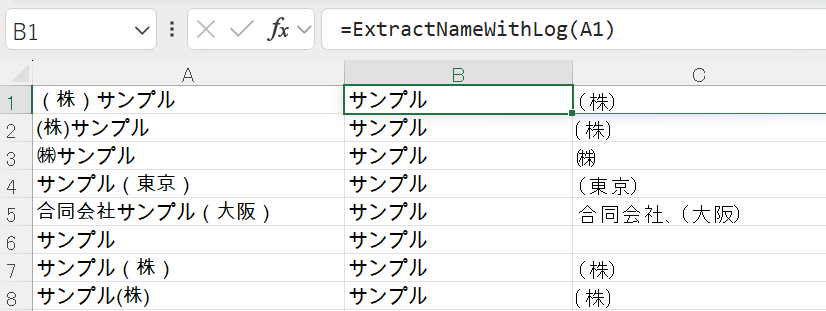
chatgptに書いてもらったのですが、画面サイズを大きくしている関係で、スクショが1.5倍になってしまい大苦戦!Geminiに等倍にするよう助けてもらいました。備忘です。
画面上の「見た目」の数値を指定のところは、お好みの数値になるのですが、これはまた後日に。
Option Explicit

#If VBA7 Then
    Private Declare PtrSafe Function GetDC Lib "user32" (ByVal hwnd As LongPtr) As LongPtr
    Private Declare PtrSafe Function ReleaseDC Lib "user32" (ByVal hwnd As LongPtr, ByVal hdc As LongPtr) As Long
    Private Declare PtrSafe Function CreateCompatibleDC Lib "gdi32" (ByVal hdc As LongPtr) As LongPtr
    Private Declare PtrSafe Function CreateCompatibleBitmap Lib "gdi32" (ByVal hdc As LongPtr, ByVal nWidth As Long, ByVal nHeight As Long) As LongPtr
    Private Declare PtrSafe Function SelectObject Lib "gdi32" (ByVal hdc As LongPtr, ByVal hObject As LongPtr) As LongPtr
    Private Declare PtrSafe Function BitBlt Lib "gdi32" ( _
        ByVal hDestDC As LongPtr, _
        ByVal x As Long, ByVal y As Long, _
        ByVal nWidth As Long, ByVal nHeight As Long, _
        ByVal hSrcDC As LongPtr, _
        ByVal xSrc As Long, ByVal ySrc As Long, _
        ByVal dwRop As Long) As Long
    Private Declare PtrSafe Function DeleteObject Lib "gdi32" (ByVal hObject As LongPtr) As Long
    Private Declare PtrSafe Function DeleteDC Lib "gdi32" (ByVal hdc As LongPtr) As Long
    Private Declare PtrSafe Function GetDeviceCaps Lib "gdi32" (ByVal hdc As LongPtr, ByVal nIndex As Long) As Long
    Private Declare PtrSafe Function OpenClipboard Lib "user32" (ByVal hwnd As LongPtr) As Long
    Private Declare PtrSafe Function EmptyClipboard Lib "user32" () As Long
    Private Declare PtrSafe Function SetClipboardData Lib "user32" (ByVal wFormat As Long, ByVal hMem As LongPtr) As LongPtr
    Private Declare PtrSafe Function CloseClipboard Lib "user32" () As Long
#End If

Private Const SRCCOPY As Long = &HCC0020
Private Const CF_BITMAP As Long = 2
Private Const LOGPIXELSX As Long = 88

' DPI倍率を取得する関数
Function GetDPIScale() As Double
    Dim hdc As LongPtr
    Dim dpi As Long
    hdc = GetDC(0)
    dpi = GetDeviceCaps(hdc, LOGPIXELSX)
    ReleaseDC 0, hdc
    GetDPIScale = dpi / 96#
End Function

Sub OneButton_Screenshot_And_Paste()
    ' DPI倍率を取得(150%なら1.5)
    Dim DS As Double
    DS = GetDPIScale()

    ' === 取得したい座標(論理座標) ===
    ' 画面上の「見た目」の数値を指定
    Dim x1 As Long: x1 = 200
    Dim y1 As Long: y1 = 100
    Dim x2 As Long: x2 = 900
    Dim y2 As Long: y2 = 600

    ' ① スクリーンショット(DPI補正してキャプチャ)
    ' APIに渡す前に倍率を掛けて「物理ピクセル」に変換します
    CaptureToClipboard CLng(x1 * DS), CLng(y1 * DS), CLng(x2 * DS), CLng(y2 * DS)

    ' ② A1下に貼り付け(サイズを補正)
    PasteBelowA1 DS

End Sub

Sub CaptureToClipboard(px1 As Long, py1 As Long, px2 As Long, py2 As Long)
    Dim w As Long, h As Long
    w = px2 - px1
    h = py2 - py1

    Dim hScreenDC As LongPtr, hMemDC As LongPtr, hBmp As LongPtr, hOld As LongPtr
    hScreenDC = GetDC(0)
    hMemDC = CreateCompatibleDC(hScreenDC)
    hBmp = CreateCompatibleBitmap(hScreenDC, w, h)
    hOld = SelectObject(hMemDC, hBmp)

    BitBlt hMemDC, 0, 0, w, h, hScreenDC, px1, py1, SRCCOPY

    OpenClipboard 0
    EmptyClipboard
    SetClipboardData CF_BITMAP, hBmp
    CloseClipboard

    SelectObject hMemDC, hOld
    DeleteObject hBmp
    DeleteDC hMemDC
    ReleaseDC 0, hScreenDC
End Sub

Sub PasteBelowA1(DS As Double)
    Dim ws As Worksheet
    Set ws = ActiveSheet

    Dim baseLeft As Double, maxBottom As Double
    Dim shp As Shape

    baseLeft = ws.Range("A1").Left
    maxBottom = ws.Range("A1").Top

    ' 既存の画像の下に配置するロジック
    For Each shp In ws.Shapes
        If shp.Type = msoPicture Then
            If shp.Left >= baseLeft - 5 And shp.Left <= baseLeft + ws.Range("A1").Width + 5 Then
                If shp.Top + shp.Height > maxBottom Then
                    maxBottom = shp.Top + shp.Height
                End If
            End If
        End If
    Next shp

    ' 貼り付け
    ws.Paste

    ' 貼り付けた直後の画像(最新のShape)を補正
    With ws.Shapes(ws.Shapes.Count)
        .LockAspectRatio = msoTrue ' 縦横比を維持

        ' 【重要】DPI倍率の逆数を掛けて、Excel上のポイントサイズを適正化する
        .ScaleHeight 1 / DS, msoTrue
        .ScaleWidth 1 / DS, msoTrue

        .Left = baseLeft
        .Top = maxBottom + 10
        .Placement = xlMoveAndSize
    End With
End Sub